Idea Notebook for KDP Interior: A Practical Publishing Blueprint
Capturing an idea is often harder than executing it. The fleeting thought in the shower, the spark during a commute, or the sudden solution to a nagging problem — these moments demand a reliable capture system. For years, professionals and creators have turned to physical notebooks for this exact reason. But not all notebooks are built the same. The Idea Notebook for KDP Interior represents a careful balance of thoughtful design, technical precision, and real-world usability. It is a template built not just for writing, but for the entire journey from concept to printed product on Amazon.
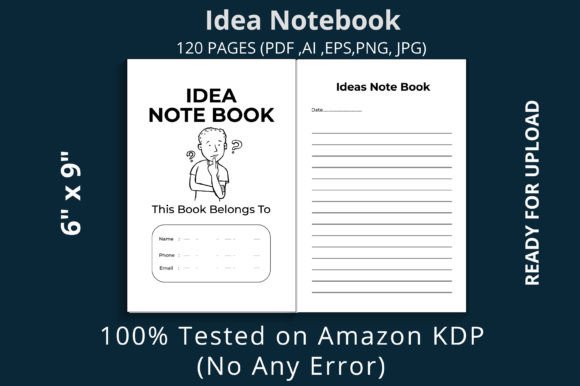
Why Specs Like 6x9 and 120 Pages Matter
When evaluating any notebook interior, the physical dimensions and page count are the first indicators of its utility. The 6 x 9 inch trim size is a classic for good reason. It is large enough to accommodate substantial mind maps, detailed lists, and structured outlines, yet compact enough to slide into a messenger bag or sit comfortably on a cramped café table. It strikes that rare balance between being a desk companion and a portable tool.
At 120 pages, this interior avoids the common pitfalls of either extreme. A notebook that is too thin feels disposable and runs out before a project truly gains momentum. One that is too thick can be intimidating and heavy. 120 pages provides enough space for a focused 30-day challenge, a quarterly business review, or a semester's worth of lecture notes. It invites completion. For the user, that sense of finishing a notebook and flipping back through the pages is incredibly rewarding. For the publisher, it represents a product that feels substantial without pushing print costs unnecessarily high.
The 300 DPI resolution is another spec that deserves attention. High DPI ensures that any lines, grids, or subtle textures print with exceptional clarity. When you are writing with a fine-tip pen or sketching a quick diagram, crisp lines keep your thoughts organized. Ghosting and fuzzy print are distractions that break creative flow. This interior prioritizes a clean visual experience on every page.
The Value of KDP Testing and No Bleed Formatting
If you have ever uploaded a book to Amazon KDP, you know that the difference between a successful upload and a frustrating error message often comes down to formatting details. This is where the Idea Notebook for KDP Interior shows its strength. It is marketed as KDP tested with no errors. That is not a trivial claim. It means the file has already navigated Amazon's specific requirements for margins, resolution, and file structure. You avoid the late-night panic of a rejected upload or a formatting glitch that ruins the layout.
The No Bleed specification simplifies the process even further. Bleed settings require extending design elements beyond the trim line, which adds complexity and cost. With no bleed, the content stays safely within the page boundaries. This is ideal for notebooks where the focus is on clean, contained lines rather than edge-to-edge imagery. It also makes the file more forgiving for first-time publishers who are still learning the ropes of KDP's dashboard. You get a predictable result every time you upload.
Real-World Applications Across Different Roles
The true test of any notebook interior is how well it adapts to different workflows. The layout and format of this design lend themselves to a surprisingly wide range of professional and personal uses.
For the Entrepreneur and Marketer
Entrepreneurs juggle multiple streams of thinking at once. Customer profiles, product features, pricing strategies, and campaign taglines all compete for mental space. A dedicated Idea Notebook for KDP Interior becomes the external hard drive for the brain. Use it for daily brain dumps where you pour out unfiltered ideas before prioritizing them. The 6x9 pages give you room to write in columns or circle actionable items. Over the course of a quarter, those 120 pages become a tangible record of how a business strategy evolved from raw thought to executed plan.
For the Educator and Content Creator
Developing a curriculum or a content calendar requires structure. An educator designing a new course can use this notebook to map out modules, jot down lecture bullet points, and list resource materials. The linear flow of the pages mirrors the sequential nature of learning. For a content creator, the notebook serves as a swipe file for headlines, video script snippets, and audience questions. Having a single, organized physical space prevents ideas from scattering across random sticky notes and digital documents. The 120-page capacity is perfect for outlining an entire semester or a 90-day content sprint.
For the Freelancer and Creative Professional
Freelancers often wear multiple hats: designer, accountant, project manager, and salesperson. This notebook interior adapts to each role. A freelance graphic designer might sketch client logos on one page and jot down pricing structures on the next. A writer can outline chapters, note character traits, and draft dialogue. The consistent format provides a reliable canvas regardless of the creative industry. Because the interior is clean and distraction-free, the focus remains entirely on the content you are generating.
What the Included File Formats Mean for You
One of the most practical features of this product is the range of included file formats. You receive PNG, JPG, PDF, and AI files. The fully editable AI file is particularly valuable if you plan to customize the notebook for your own brand. You can adjust the header design, add a logo, or tweak the page layout to better suit your audience. The high-resolution JPG files with 300 DPI offer a simple plug-and-play option for platforms that prefer image uploads.
The Print Ready PDF is the workhorse file. It is optimized specifically for KDP's requirements, meaning you can upload it directly without additional adjustments. This is a significant time saver. Instead of spending hours wrestling with margins and bleeds in design software, you can focus on writing a compelling book description and designing an eye-catching cover. For any serious publisher on Amazon KDP, having a comprehensive file package like this reduces friction and accelerates the path to going live.
Practical Tips for Getting the Most Out of the Notebook
Having a well-formatted interior is only half the equation. How you use it determines the results. Here are a few practical approaches that pair well with this specific format:
- Use it for morning pages. Write three pages of stream-of-consciousness thoughts every morning. The 6x9 size is perfect for this practice, as it is large enough to generate meaningful volume without feeling overwhelming.
- Create a swipe file system. Reserve pages for specific categories: headlines, customer pain points, product names, and marketing angles. When inspiration strikes, you know exactly which section to turn to.
- Pair it with quality tools. The 300 DPI lines are crisp, so use a pen that complements the paper. A fine-liner gel pen or a smooth rollerball will glide across the page and keep your handwriting readable.
- Digitize when finished. Once you fill the 120 pages, scan the most valuable sections. The trim size fits standard flatbed scanners, making it easy to archive your ideas digitally for long-term reference.
- Gift it to clients or team members. If you are a coach or manager, a branded version of this notebook makes a practical gift. It shows you value organization and thoughtful planning.
Final Observations on the Publishing Experience
The Idea Notebook for KDP Interior succeeds because it respects the needs of both the end user and the publisher. For the person who eventually buys the printed book, it offers a reliable, high-quality space for thinking. For the publisher, it removes the technical guesswork that often derails low-content book projects. The combination of a tested file, high-resolution output, and multiple editable formats creates a foundation you can trust.
When you are evaluating interiors for your next KDP project, look beyond just the page count. Consider how the trim size affects portability, how the DPI affects print quality, and whether the file has been validated on the platform. This interior checks those boxes while providing enough flexibility to adapt to different niches and audiences. Whether you are launching a single notebook or building an entire brand around structured idea capture, this template gives you a solid, professional starting point.