Family Meal Planner V1: KDP Interior Guide
Planning family meals can feel like a constant challenge between busy schedules, picky eaters, and the need to keep grocery costs in check. The Family-Meal-Planner-V1 KDP Interior offers a structured yet flexible solution for anyone looking to bring order to their kitchen routine. Whether you are a creator preparing a low-content book for Amazon KDP or a home cook wanting a dedicated planning system, this interior set provides a practical foundation.
What Makes This Meal Planner Interior Different
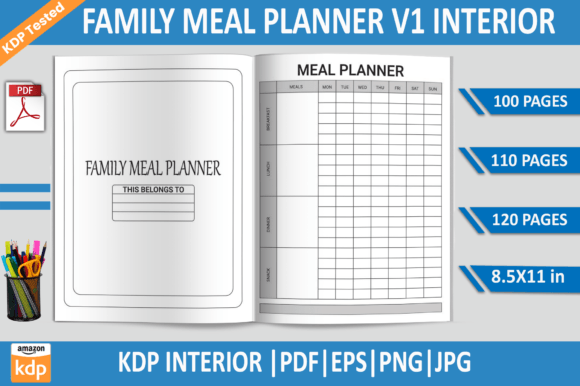
This interior is not just a set of blank pages. It is a complete package designed for both digital printing and physical journaling. With file options including PDF, EPS, PNG, and JPG, the versatility is immediately apparent. You can work directly in Adobe Illustrator to tweak layouts, or print the ready-to-use PDFs for a no-fuss planning experience.
The included page counts—100, 110, and 120 pages—give you flexibility depending on how long you want your planner to cover. A 100-page version might suit a three-month plan, while 120 pages could stretch across a full season or include extra note sections. The standard 8.5x11 inch trim size is familiar and practical, fitting easily into binders or on countertops.
Core Features That Support Real Meal Planning
When you open the PDF or edit the EPS file, you will notice that every page is built with clarity in mind. The 300 DPI resolution ensures crisp text and clean grid lines whether you print at home or through a professional service. Because the files were tested on Amazon KDP, you can trust that the formatting aligns with platform requirements—no surprises with margins or trim issues.
The no-bleed setup simplifies uploading and printing. For KDP creators, this means fewer setup headaches and faster publishing. For home users, it means pages that look clean without needing to trim excess white space.
For KDP Creators and Designers
If you are publishing on Amazon KDP, this interior saves hours of layout work. The editable EPS file lets you:
- Adjust colors to match your brand or series aesthetic.
- Add your own headers, icons, or decorative elements.
- Reorder sections or insert additional pages like shopping lists or storage notes.
- Export to print-ready PDF with confidence, knowing bleed settings are already handled.
One approach is to create a series of planners—maybe one focused on budget-friendly meals, another on seasonal produce, and a third on batch cooking. The consistent interior structure across your series builds recognition with buyers. You could also pair this planner with a matching cover design using the PNG files for a cohesive look.
For Entrepreneurs and Small Business Owners
Meal planning is a popular niche in the productivity and home management space. You could use this interior as a lead magnet, a bonus item in a digital shop on Gumroad or Etsy, or as part of a bigger bundle. The transparent background PNG files make it easy to create mockups, social media graphics, or preview images without needing to cut out backgrounds manually.
You might also consider offering both a pre-filled sample and a blank version. The pre-filled sample acts as a demonstration of how the planner works, while the blank version stays available for purchase. This tactic builds trust with potential customers who want to see real usability before committing.
For Home Cooks and Busy Families
On a personal level, this planner can transform how you approach weekly menus. Instead of scrambling each afternoon to figure out dinner, you can sit down once a week and map out breakfasts, lunches, dinners, and snacks. The consistent layout helps you spot patterns—too many takeout nights, repeated ingredients, or gaps in nutritional variety.
You could also involve your family in the planning process. Give each person a different color pen and let them mark their preferences for the week. The clear grid structure keeps everything organized without becoming overwhelming. Over time, you build a personal archive of meal ideas that you can cycle through, reducing decision fatigue.
Budget-Focused Meal Planning
If saving money is your priority, use the planner to track ingredient costs. Add a small column or dedicated space on each page for estimated totals. Over several weeks, you will see which meals stretch your grocery dollar furthest. You could also create a variation of the interior that includes a budget tracker page at the beginning or end of the PDF.
Dietary and Allergy Management
For families managing food allergies or specific diets—gluten-free, vegetarian, low-carb—the planner becomes a safety tool. Use the notes area to check ingredient labels or list substitutes in advance. The clean layout makes it easy to scan for potential problem ingredients before cooking begins.
Batch Cooking and Freezer Prep
Batch cooking enthusiasts will appreciate having dedicated space to plan cooking sessions. Mark which meals are freezer-friendly and which need fresh ingredients. You could even create a variation where Sundays are highlighted as prep days. The 120-page version gives you room to add freezer inventory pages between planner sections.
Practical Tips for Effective Meal Planning
Even the best interior needs a thoughtful process behind it. Here are recommendations to get the most out of your planner:
- Keep a running list of family favorites. Use the first few pages to brainstorm meals everyone enjoys. This makes weekly planning faster because you are choosing from a known set.
- Be realistic about leftovers. Plan one or two nights per week for using leftovers creatively—soup from roast vegetables, stir-fry from grilled chicken. Mark these explicitly so you don't overplan.
- Involve the household. Let each person pick one meal per week. This builds buy-in and reduces complaints at the table. The structured grid makes it easy to assign slots.
- Review and adjust. At the end of each week, note what worked and what did not. Did you overestimate how often you would cook from scratch? Underestimate takeout cravings? Use the notes space honestly.
- Stock your pantry first. Before you plan a full week, make a list of what you already have. The planner's simple layout lets you check off ingredients you do not need to buy.
Design Variations and Styling Approaches
One advantage of the editable EPS file is that you can adapt the visual tone to match different audiences. For a clean, minimalist look, keep the grid lines subtle and use a single accent color. For a playful family planner, add soft icons of fruits, vegetables, or kitchen tools. The PNG files with transparent backgrounds let you layer elements without disrupting the main layout.
You could also experiment with size variations. While the standard 8.5x11 inches is practical, the EPS file allows you to scale down for a personal journal or up for a wall poster. If you are creating a digital version for tablets, consider adding hyperlinked tabs or a clickable index—something the EPS structure can support with additional work.
Staying Organized Across Weeks and Months
Consistency matters when you are planning week after week. The same header placement, same grid spacing, same font choice across all pages creates a rhythm that your brain starts to follow automatically. You do not waste time figuring out where to write—you just write. That is the quiet power of a well-designed interior.
To keep everything organized, consider adding a table of contents page at the start that lists the weeks or months covered. Even a simple index with page numbers helps you flip back to find a favorite meal from three weeks ago. The 120-page version gives you enough room for quarterly markers or seasonal dividers.
Balancing Creativity with Practicality
While it is tempting to fill every corner of the page with decorative elements, remember that a meal planner's primary job is to be usable. Keep your design choices purposeful. A colored header helps separate weeks. A subtle grid helps align handwriting. White space is not empty—it is breathing room for your weekly plan. When you edit the EPS file, test readability by printing a single page and writing on it before committing to a full batch.
If you are publishing for others, include a sample page in your product listing that shows handwritten notes. This reassures buyers that the planner works with real pens and real schedules.
Who Benefits Most from This Interior
This interior suits a wide range of users:
- Publishers looking for a tested, print-ready KDP interior that reduces setup time.
- Designers who want a base layout they can customize and rebrand.
- Hobbyists building a home management system for personal use.
- Freelancers offering custom planner design services to clients.
- Educators teaching low-content publishing workflows.
- Bloggers creating printable resources for their audience.
Each user can approach the same files differently. The PDF versions are ready to go in minutes. The EPS and PNG files invite deeper customization. The JPG files work for quick mockups or social previews.
Final Thoughts on Using the Family Meal Planner
A meal planner is only as good as the habits it supports. The Family-Meal-Planner-V1 KDP Interior gives you a sturdy, adaptable structure, but the real value comes from using it consistently. Start with one week. See how it feels. Adjust the layout in the EPS file if something is missing. Add a shopping list column. Change the day order. Make the planner yours.
Whether you publish it on KDP, sell it on your own site, or print it for your kitchen counter, the flexibility of this interior means it can grow with your needs. The tested quality, multiple file formats, and clear layout all point to one thing: a tool that actually helps you plan meals without getting in the way.