The Ultimate Guide to Creating a Custom Party Planner with Canva Templates
Planning a party can feel overwhelming. Between choosing a theme, organizing the guest list, coordinating entertainment, and keeping track of all the little details, it's easy to feel like you need a professional event coordinator just to pull off a memorable celebration. Fortunately, you don't need a degree in event planning or a big budget to stay organized. With a well-designed party planner, you can manage every aspect of your event with confidence. And when that planner is fully editable through a Canva template, you unlock a world of creative possibilities without starting from scratch. In this guide, we'll explore everything you need to know about using an editable party planner to simplify your event planning process, add your personal touch, and create a beautiful, functional tool that works for you.
What Is a Party Planner and Why Do You Need One?
A party planner is essentially a structured document or set of pages designed to help you organize every detail of an event. Think of it as your command center. Instead of scattering notes across sticky pads, phone reminders, and random emails, you consolidate everything into one place. A comprehensive party planner typically includes sections for the event overview, budget, guest list, menu, entertainment, tasks, and notes. By using a planner, you reduce stress, minimize forgotten details, and gain a clear bird's-eye view of your event from start to finish.
Whether you're planning a child's birthday party, a holiday gathering, a milestone anniversary, or a casual backyard barbecue, a planner helps you stay on track. It also makes it easier to delegate tasks to family members or co-hosts because everything is clearly laid out. In short, a party planner transforms chaos into clarity.
The Growing Popularity of Editable Digital Planners
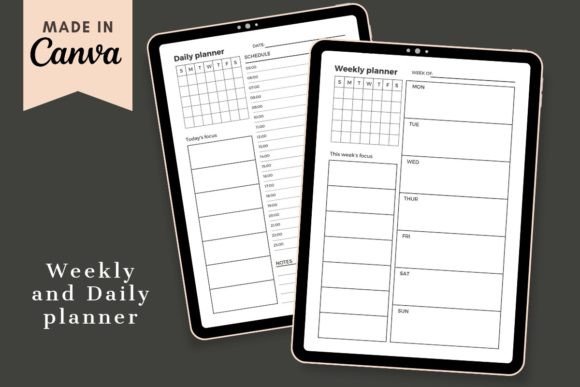
In recent years, digital planners have surged in popularity, especially those built on platforms like Canva. Why? Because they offer flexibility that traditional pre-printed planners cannot. With an editable Canva template, you are not stuck with a fixed design or layout. You can change colors, fonts, images, backgrounds, and even rearrange sections to match your unique style. This level of customization means your planner feels personal and intentional, not generic.
Moreover, digital planners are eco-friendly. You can use them on your tablet or computer, or print only the pages you need. When you download an editable party planner, you typically receive a printable PDF, along with instructions for customizing the Canva template. This hybrid approach gives you the best of both worlds: digital flexibility and the option to have a physical copy in hand.
What's Inside an Editable Party Planner Template?
A well-made party planner template includes all the essential pages you need to organize your event. Here is a closer look at the key components you can expect:
Party Planner Overview Page
This is the big-picture page where you define the core details of your event. You can record the event name, date, time, location, theme, color scheme, and budget. It serves as your quick-reference sheet throughout the planning process. Having this information front and center helps you stay aligned with your vision.
Entertainment Planner
Entertainment is often the heart of any party, and a dedicated entertainment planner section ensures you don't overlook this critical element. Here you can list planned activities, games, music playlists, live performers, or DJs. You can also note timing for each activity, equipment needs, and who is responsible for setup. Whether it's a magician for a kids' party or a curated playlist for a dinner party, this page keeps your entertainment organized and on schedule.
Guest List
Managing who is coming is one of the most practical aspects of party planning. The guest list section typically includes columns for names, contact information, RSVP status, dietary restrictions, and plus-ones. Having a clear guest list helps you plan seating, food quantities, and party favors. It also makes follow-up communication easy because all your contacts are in one place.
Notes Page
A notes section might seem simple, but it is incredibly valuable. During the planning process, ideas, reminders, and random to-dos pop up constantly. Instead of losing those thoughts, you capture them immediately. Notes pages can also serve as a journal after the event, where you record what worked well and what you might change next time.
Why Choose a Canva Template for Your Party Planner?
Canva has become a go-to design platform for non-designers and professionals alike. Its drag-and-drop interface is intuitive, and the library of fonts, colors, images, and elements is vast. When you choose an editable Canva template for your party planner, you gain several distinct advantages:
- Full customization: Change any element to match your event theme or personal taste. Colors, fonts, layouts, images, and backgrounds are all adjustable.
- No design experience needed: If you have basic knowledge of Canva, you can customize the template easily. The interface guides you naturally.
- Multiple sizes included: Most high-quality templates come in A5, A4, and US Letter sizes, so you can print or display your planner in the format that suits you best.
- Instant download: After purchase, you typically receive a PDF file, a JPEG file, and a link to the editable Canva template. The instruction file walks you through customization step by step.
- Free elements and fonts: Many templates include free Canva elements and fonts that auto-update when you change your color scheme, saving you time and ensuring a cohesive look.
Understanding the File Formats
When you download an editable party planner, you will usually receive several file types. Here is what each one does:
- Editable Canva Template Link: This is the main file you will work with. It opens in Canva, where you can customize every page.
- PDF file: A printable version of your customized planner. Once you finish editing in Canva, you can download your final design as a PDF and print it at home or at a print shop.
- JPEG file: Image files of your planner pages, useful for digital use, sharing with co-planners, or previewing.
- Instructions PDF: A guide that explains how to access the template, customize it, and download your final version. Even if you are new to Canva, these instructions make the process straightforward.
How to Customize Your Party Planner Step by Step
Customizing your editable party planner is easier than you might think. Here is a simple workflow that works for beginners and experienced Canva users alike:
- Open the template link: Click the link provided in your download. It will open in Canva (you may need to create a free account if you don't have one).
- Choose your size: Select the page size you want to work with: A5 for a compact planner, A4 for a standard notebook size, or US Letter for easy printing.
- Change the color palette: Use Canva's color-change tool to update the entire template. Many templates have "auto-change" color features that apply your chosen palette across all pages instantly.
- Update fonts: Select text elements and choose fonts from Canva's library. You can mix heading fonts with body fonts for visual interest.
- Replace images and backgrounds: Drag and drop your own photos or choose from Canva's free stock image library. You can also adjust backgrounds to be solid colors, gradients, or patterns.
- Edit text and content: Click any text box to add your own information. Fill in your party details, guest names, entertainment plans, and notes.
- Adjust layouts if needed: Canva's drag-and-drop interface lets you move elements around. You can add or remove pages, resize text boxes, and rearrange sections to fit your needs.
- Download your final planner: Once you are happy with the design, download it as a PDF for printing or keep it as a digital file for use on your tablet or phone.
Practical Tips for Getting the Most Out of Your Party Planner
Using a template is only the first step. To truly benefit from your party planner, consider these practical strategies:
- Start early: Open your planner as soon as you decide to host an event. Even if the date is months away, jotting down ideas early prevents last-minute scrambling.
- Use it as a communication tool: Share the planner with co-hosts or family members. Because it's editable, you can collaborate in real time if you use Canva's sharing features.
- Print only what you need: If you prefer a physical copy, print just the pages you will reference during the event, like the guest list or entertainment schedule.
- Keep a digital backup: Save your final planner as both a PDF and a Canva template. That way, you can reuse and modify it for future events.
- Evaluate after the event: Use the notes section to reflect on what went well and what you might change. Over time, you will build a library of personalized planners for every type of occasion.
Common Misunderstandings About Editable Party Planners
Some people assume that using a template means sacrificing originality. In reality, the opposite is true. A template provides a solid foundation, but the customization options allow you to infuse your personality into every page. Another misconception is that you need advanced design skills. With Canva's simple interface and the included instructions, even a first-time user can create a polished planner. Finally, some worry that digital planners are less practical than paper. But with the ability to print any page at any time, you get the convenience of both worlds.
Who Can Benefit from a Party Planner Template?
The short answer is: anyone hosting an event. But let's break it down by specific use cases:
- Busy parents: Juggling school, work, and extracurriculars makes organization essential. A party planner helps you coordinate birthday parties, holiday gatherings, and family reunions without losing your mind.
- Event planners and coordinators: Professionals can use editable templates as client-facing documents or internal planning tools. The ability to customize branding elements makes templates ideal for business use.
- DIY hosts: If you love throwing parties but prefer a hands-on approach, a customizable planner gives you structure while allowing room for creativity.
- Teachers and community organizers: Classroom parties, fundraisers, and community events all require planning. A template simplifies logistics and keeps volunteers on the same page.
- Anyone on a budget: Hiring a professional event planner is expensive. A DIY planner template gives you professional-level organization for a fraction of the cost.
Why This Editable Party Planner Stands Out
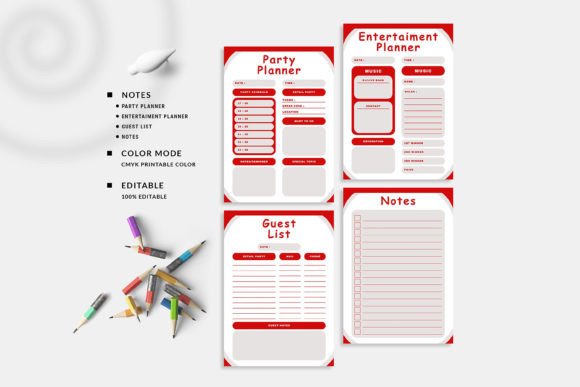
Not all templates are created equal. The editable party planner described here includes everything you need to get started. With four core pages—Party Planner, Entertainment Planner, Guest List, and Notes—you have complete coverage of the planning process. The inclusion of multiple sizes (A5, A4, and US Letter) ensures that your planner fits your preferred format, whether you are using a binder, a notebook, or a digital device. And with free elements, auto-changing fonts and colors, and clear instructions, the barrier to creating a beautiful, functional planner is incredibly low.
The Value of Instructions and Support
One of the most overlooked aspects of a good template is the quality of its instructions. This product includes a dedicated PDF instruction file that walks you through customization from start to finish. Even if you have only basic knowledge of Canva, you can confidently edit every element. The instruction file removes guesswork and empowers you to focus on the fun part: designing a planner that reflects your personal style.
Final Thoughts: Take Control of Your Event Planning
Party planning doesn't have to be stressful. By using an editable party planner built on a Canva template, you give yourself a clear structure while retaining complete creative control. You can change colors to match your theme, choose fonts that express your personality, and organize every detail in a way that makes sense for you. Whether you print your planner, use it digitally, or do a combination of both, you will approach your next event with confidence and clarity.
The best part is that once you customize your planner, you can reuse it again and again for future celebrations. Update the colors, swap out images, and tweak the text to fit each new occasion. Over time, you will build a collection of personalized planners for every type of event imaginable. So go ahead, download your template, open Canva, and start creating a party planner that is truly yours. Your next event—and your peace of mind—will thank you.