Simple Daily and Weekly Planner: A Practical Guide to Organizing Your Life
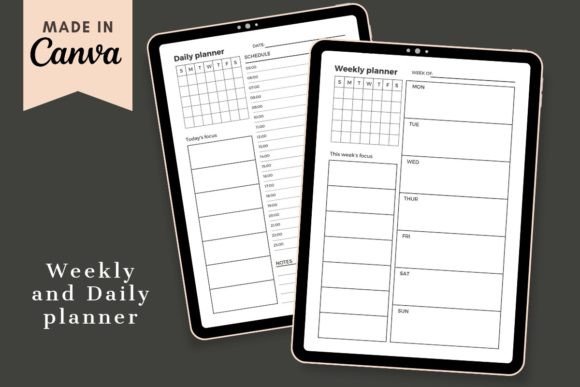
Planning is not about filling in boxes—it’s about creating a structure that helps you move from intention to action. The Simple Daily and Weekly Planner, an editable Canva template, gives you a clean, modern framework to organize both your days and your weeks. Whether you are a freelancer juggling multiple clients, a marketer mapping out content, a small business owner tracking operations, or simply someone who wants to reclaim control over their time, this planner fits naturally into your existing workflow.
Unlike rigid paper planners or complex digital tools, this template is designed for flexibility. You can customize it in minutes using a free Canva account, print it, or keep it digital. The result: a planning system that adapts to your process rather than forcing you to adapt to it.
Where the Simple Daily and Weekly Planner Fits in Your Workflow
Planning is not a one-time event; it unfolds across a cycle of preparation, execution, and reflection. The Simple Daily and Weekly Planner supports each phase without requiring you to overhaul the way you work.
Before a Project or Task: Preparation and Prioritization
When you begin a project, whether it is launching a campaign, writing a course, or organizing a team workflow, the first step is to translate big goals into manageable chunks. The weekly layout helps you map out major milestones, deadlines, and recurring responsibilities. Use it to allocate time blocks for deep work, meetings, and administrative tasks. The daily pages then break each week into focused actions. By seeing your week at a glance, you can spot potential bottlenecks and balance your workload before you dive in.
During Execution: Real-Time Guidance and Adaptability
As you work through your tasks, the planner acts as a living document. Write down priorities for the day, check off completed items, and adjust as new requests come in. Because the template is editable in Canva, you can tweak sections mid-week—add a column for urgent tasks, color-code by project, or insert a quick note about a change in direction. This adaptability is crucial for professionals dealing with shifting deadlines or creative processes that rarely follow a straight line.
After Completion: Reflection and Continuous Improvement
After finishing a project or a week, review your planner to see what worked and what didn’t. Did you underestimate the time needed for certain tasks? Were there recurring interruptions? Use the margins or extra pages to jot down observations. This reflection turns the planner from a simple schedule into a tool for refining your personal productivity system over time.
How the Planner Interacts with Other Tools, Resources, and Platforms
No tool operates in isolation. The Simple Daily and Weekly Planner works alongside the applications and methods you already rely on.
- Canva itself: The template lives inside Canva’s editor, so you can drag and drop elements, change fonts, adjust colors, and add your own graphics. It integrates seamlessly with Canva’s photo library, brand kits, and team collaboration features. If you use Canva for other design work (social media graphics, presentations, documents), your planner becomes part of a consistent visual system.
- Digital calendars (Google Calendar, Outlook, Apple Calendar): Use the weekly planner to block out time offline, then sync the same events to your digital calendar for alerts and sharing. The planner gives you a tactile overview that digital calendars often lack, while the calendar ensures you never miss a hard deadline.
- Task management apps (Trello, Asana, Notion, Todoist): The daily page can serve as a daily “do” list that you pull from your project management tool. At the start of each day, transfer your top 3–5 tasks from your app into the planner. This prevents app overload and keeps your focus narrow.
- Paper and print: You can download the template as a PDF and print it. Many people find that writing by hand improves memory and commitment. Print a stack of weekly spreads and keep them in a binder, or laminate a reusable version. The digital origin means you can also edit and reprint whenever your priorities shift.
- Collaboration with team members: If you share a Canva team account, you can allow colleagues to view or edit the planner. For example, a small team might use a shared weekly page to track deadlines, meetings, and task ownership. This keeps everyone aligned without the noise of a full project management suite.
Practical Implementation Tips for Long-Term Use
Getting the most out of any planner requires more than downloading a file. Here are actionable steps to integrate the Simple Daily and Weekly Planner into your routine, whether you are a solo entrepreneur or part of a larger organization.
Start With a Weekly Planning Session
Set aside 15–20 minutes every Sunday (or whatever day kicks off your work week). Open the weekly template in Canva. List all upcoming commitments, deadlines, and important events. Then add personal items (exercise, appointments, family time) so your week feels balanced. Once the big picture is set, you only need 5 minutes each morning to fill in the daily page with specific actions.
Customize for Your Work Style
The template comes with a clean, modern layout, but you should tailor it. If you are a content creator, add a column for content ideas or social media posts. If you are a project manager, include a section for risk notes or dependencies. Canva’s drag-and-drop interface makes it easy to resize boxes, insert icons, or change the color scheme to match your brand. Do not be afraid to duplicate a page and create variations for different types of weeks (heavy meeting weeks vs. deep work weeks).
Use the Digital Version for Easy Updates
Because the planner is a Canva template, you can keep it entirely digital. Save each week as a separate page in a single Canva document, or create a new design each week. Use the “Download” button to export as PDF or PNG and store it in a folder for future reference. This is especially useful for freelancers and small business owners who need to track their time for invoices or client reports.
Combine Daily and Weekly Views for Consistency
The real power is in the connection between the two layouts. After you fill out your weekly plan, each day simply becomes a subset of that larger view. For example, if your weekly plan shows three client calls on Wednesday, your daily page for Wednesday should list those calls and the prep work required. This layered approach reduces mental load because you are never starting from scratch each morning.
Involve Team Members or Family Members
If you share a household or work with a small team, sharing the planner digitally can improve coordination. Use Canva’s share settings to allow editing or commenting. For a family, create a weekly planner that includes everyone’s schedules, meal plans, and chores. For a remote team, use the weekly page to outline shared deadlines and individual responsibilities. The template becomes a single source of truth that reduces back-and-forth messages.
Quality Control and Consistency Over Time
A planner is only as good as your commitment to using it consistently. To make the Simple Daily and Weekly Planner a lasting habit, focus on three factors:
- Placement: Keep the template accessible. If you use it digitally, pin the Canva tab or keep a shortcut on your phone’s home screen. If you print it, put the paper on your desk or in a visible spot. Out of sight often means out of mind.
- Review rhythm: At the end of each day, take two minutes to review what you completed and what needs to shift to tomorrow. At the end of each week, review the full spread. This review loop reinforces the habit and provides data for future planning.
- When life disrupts the plan: No planner can prevent emergencies. When you miss a day or a week, simply pick up where you left off. The template’s editable nature means you can delete missed days and start fresh without wasting paper or pages. This low friction encourages you to return to the system quickly.
Who Benefits Most from This Approach
The Simple Daily and Weekly Planner is versatile, but it truly shines for people whose work involves multiple priorities, frequent context switching, or creative output. Bloggers and educators can use it to plan content calendars and class schedules. Marketers can manage campaign timelines and review cycles. Freelancers can track client work and administrative tasks. Hobbyists can schedule learning time or personal projects. The common thread: a need for structure that is flexible enough to accommodate change, yet simple enough to use without a steep learning curve.
Because the template supports both daily and weekly views, it bridges the gap between micro and macro planning. You are never lost in the weeds of hourly tasks, nor flying blind without a weekly roadmap. That balance is exactly what many productivity-minded adults need to stay effective without feeling overwhelmed.
Getting Started: From Download to Daily Use
To begin, you only need a free Canva account. After downloading the PDF with your purchase, open the link inside—it will take you directly to the template. From there, place your own images and text. The included fonts and elements work with the free plan, so you do not need Canva Pro. Once your layout is ready, save it as JPEG, PDF, MP4, or GIF depending on how you want to use it. You can then print it, share it on Instagram or Pinterest, keep it in your drive, or import it into a note-taking app.
The first time you customize the template, allow 15–30 minutes to set up your preferred sections. After that, weekly updates take under 10 minutes. The daily pages are even faster. Over time, you will develop your own shortcuts and variations that make the planner feel like a natural extension of your workflow.
Consistent planning does not require an elaborate system. What it does require is a tool that fits your life, your work, and your style. The Simple Daily and Weekly Planner gives you that foundation—a clean, editable canvas that you shape to your needs, week after week.