Work Planner Printable Template: A Practical Tool for Weekly Task Management
Staying organized during the workweek often feels more difficult than it should be. Between meetings, deadlines, and the constant flow of new tasks, it is easy to lose track of what truly matters. A structured system that provides both a weekly schedule and daily task slots can make a real difference. The Work Planner Printable Template addresses this need directly by offering a clean, focused layout designed for the five-day workweek. It is not a complex productivity system — it is a straightforward tool that helps you prioritize, schedule, and execute your work without unnecessary clutter.
What Makes This Work Planner Template Worth Considering
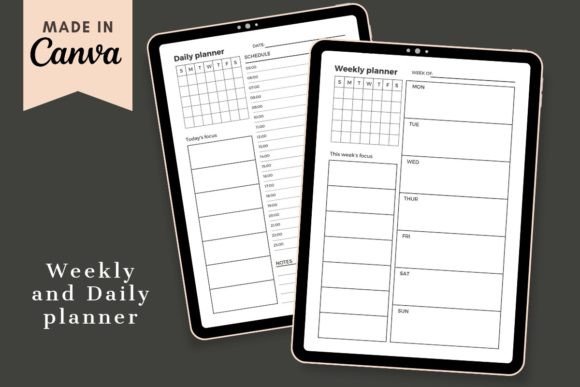
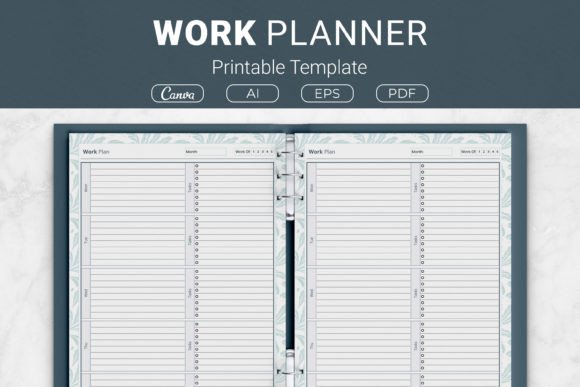
At its core, this template is built around a simple premise: give each day of the workweek a dedicated space for both scheduled time blocks and prioritized tasks. The design includes a clear schedule area for each day, plus a separate section to list the most important tasks. This separation encourages you to think about both your time commitments and your action items without mixing them together.
One notable aspect is its focus on the five-day Monday-through-Friday structure, which aligns naturally with most professional environments. The template does not attempt to include evenings or weekends, so it remains uncluttered and purpose-built for work hours. This specificity is a strength for anyone who wants to keep their professional planning separate from personal errands or leisure.
The package includes files in multiple formats: AI (Adobe Illustrator), EPS, PDF, and a link to a Canva template. Having editable source files means you can adjust colors, fonts, or layout elements if you need to match a brand or personal preference. The PDFs are ready to print, which is convenient for those who prefer pen-and-paper planning. The Canva link adds flexibility for digital use, allowing you to fill in tasks on a computer or tablet before printing or saving.
Clean, Task-First Layout
The template separates the day’s schedule from the task list. This small design choice has practical implications. When you look at your day, you can quickly scan your appointments or fixed obligations in the schedule area, then shift your focus to the task list to decide what to work on during open blocks. It reduces cognitive load compared to templates that cram everything into one combined field.
Five-Day Focus
By limiting the layout to the standard workweek, the template avoids the sprawl that often occurs with seven-day planners. This makes it especially useful for people whose weekends are set aside for rest or personal projects. The focused design also means you can see an entire week on a single page or spread without tiny fonts or cramped fields.
Multiple Sizes for Different Binders and Notebooks
The template comes in four sizes: US Letter (8.5 x 11 in), A4 (210 x 297 mm), 7.5 x 9.25 in, and 6 x 9 in. This range covers common binder and notebook formats. The US Letter and A4 sizes work well for standard three-ring binders or clipboards. The smaller 6x9 inch size is portable and fits into many personal organizers. The 7.5 x 9.25 inch option is a good middle ground. Having these options means you are not forced to resize or reformat the template to fit your existing planning system.
Editable and Ready-to-Print Formats
The inclusion of AI (Illustrator) and EPS source files gives you control over the design. You can change colors to match a company brand or a personal aesthetic. You can also adjust margins, add or remove fields, or incorporate your own headers. For users who prefer a no-fuss approach, the PDFs are print-ready with standard margins. The Canva template link is especially useful if you do not own design software but still want to make small tweaks using a browser.
Real-World Use and Effectiveness
How does this template perform when used consistently over several weeks? Based on its structure, it works best for professionals whose work involves a mix of scheduled events and self-directed tasks. For example, a project manager might block out meetings, reviews, and check-ins in the schedule section, then list the specific deliverables or follow-ups for each day in the task area. The separation helps prevent overlooking important meetings while keeping the task list actionable.
Freelancers and entrepreneurs often juggle multiple clients or projects. The daily task list gives them a place to break down larger goals into small, doable steps. Because the template only covers five days, it encourages a realistic view of what can be accomplished in a workweek. Users who have tried more complex planners sometimes find that this minimal layout reduces the temptation to overcommit or create unrealistic daily plans.
One limitation is that the template does not provide time-blocking within the schedule area beyond a simple timeline. If you need to plan your day in half-hour increments or track specific start and end times, you will need to write those details manually. The schedule section is a clean column, not a detailed hourly grid. This works well for people who prefer loose time management but might feel too vague for those who want rigid time blocking.
Another consideration is that the template is undated. This is actually a benefit for long-term use because you can print multiple copies and use them without worrying about filling in month and year headers. If you prefer dated planners, you would need to add that information manually or edit the source file.
Quality, Usability, and Flexibility
The design appears well-proportioned. Headings are clear, and the space between fields is generous enough to write comfortably. The lack of heavy graphics or decorative elements makes it suitable for professional environments. You could print it on plain paper and place it in a binder without it looking out of place in a meeting.
Usability is high for anyone comfortable with printable planners. The PDFs are formatted with standard trim sizes, so they should print correctly on home or office printers. The Canva template is easy to duplicate and edit — an advantage if you want to create a weekly template set for an entire quarter in advance.
Flexibility extends to the template’s use in Kindle Direct Publishing projects. Because it is provided as editable AI and EPS files, a publisher could modify the design to create a full interior for a paperback planner, then add a cover and publish it. The multiple sizes mean the same design can be offered in different trim sizes on KDP without redesigning from scratch. The template itself is a basic layout, so it works well as a foundation that can be expanded with additional pages like monthly overviews or notes sections.
For personal use, the template is reliable and consistent. Once you print a stack, you can grab a sheet each week and fill it in. There is no digital subscription or app to manage. For people who find digital planners distracting, this printable template offers a focused, offline planning method.
Who Benefits Most from This Work Planner Template
Professionals in structured roles such as managers, administrators, and team leads will find the schedule-and-task layout aligns with their daily reality of fixed appointments plus ongoing work. Educators who teach on a weekday schedule can use it to plan lessons and track grading priorities. Marketers and creators juggling multiple campaigns will appreciate the daily task focus.
Small business owners and entrepreneurs who manage their own time benefit from a template that helps separate planning from execution. Freelancers and bloggers who operate on project-based work can use the task list to assign specific actions to each day, reducing the feeling of being overwhelmed by a large to-do list.
Publishers and content creators who produce printable resources or KDP interiors will find this template valuable as a design asset. Because the source files are included, they can customize and repurpose the layout for their own products. The clean, generic design also works well as a base for building out a larger planner system.
Serious hobbyists who manage complex projects with multiple steps — such as event planning, volunteer coordination, or home renovation — can use the template to track tasks across a week. However, the template is most effective when your work or projects align with a Monday-to-Friday rhythm.
Who Might Find It Less Suitable
The template is not ideal for shift workers whose schedule does not follow a standard five-day week, nor for students who need space for evening study sessions. People who require detailed hourly time-blocking or who prefer a fully digital system may find the printable format lacking. If you need integrated habit tracking, goal setting, or financial logs, you would need to supplement this template with additional pages.
Practical Recommendations for Using the Template
- Print a month’s worth at once – This saves time and ensures you always have blanks ready. Use a three-hole punch to fit them into a binder.
- Use the Canva template for quick edits – If you want to add a specific header like a project name or a weekly goal, the Canva link is the fastest way to do that without downloading software.
- Pair the template with a master task list – Write down all your open tasks for the week in a separate document, then pull the most important ones into each day’s task section. This prevents the daily list from becoming too long.
- Consider laminating or using a reusable sleeve – If you want to reuse the same sheet multiple weeks, print one copy, put it in a dry-erase sleeve, and use a fine-tip marker. Wipe clean each Friday.
- Standardize your pen color coding – Assign symbols or colors for different types of tasks (e.g., meetings, creative work, admin). This keeps the template visual without adding clutter.
Final Observations
The Work Planner Printable Template occupies a useful middle ground between minimalist to-do lists and overly detailed hourly planners. It gives you a dedicated framework for each day of the workweek without forcing you into a rigid system. Its multiple sizes and editable formats make it practical for both personal productivity and commercial publishing projects. If you value a focused, weekly planning tool that stays out of your way, this template is worth trying. Its limitations are straightforward — no weekends, no time grid — which may actually be strengths if those features are not essential to your workflow. Ultimately, a planner is only as effective as your willingness to use it consistently, and this template lowers the barrier by being simple, adaptable, and ready when you need it.